Create a useful job record while protecting customer information and retaining the evidence needed to explain transactions and service decisions.
Open the full-size diagram ↗
Example and worksheet
Read the numbered Case W sections for the related fictional records. Apply the method to your own conditions.
Give Each Job a Record You Can Reconstruct
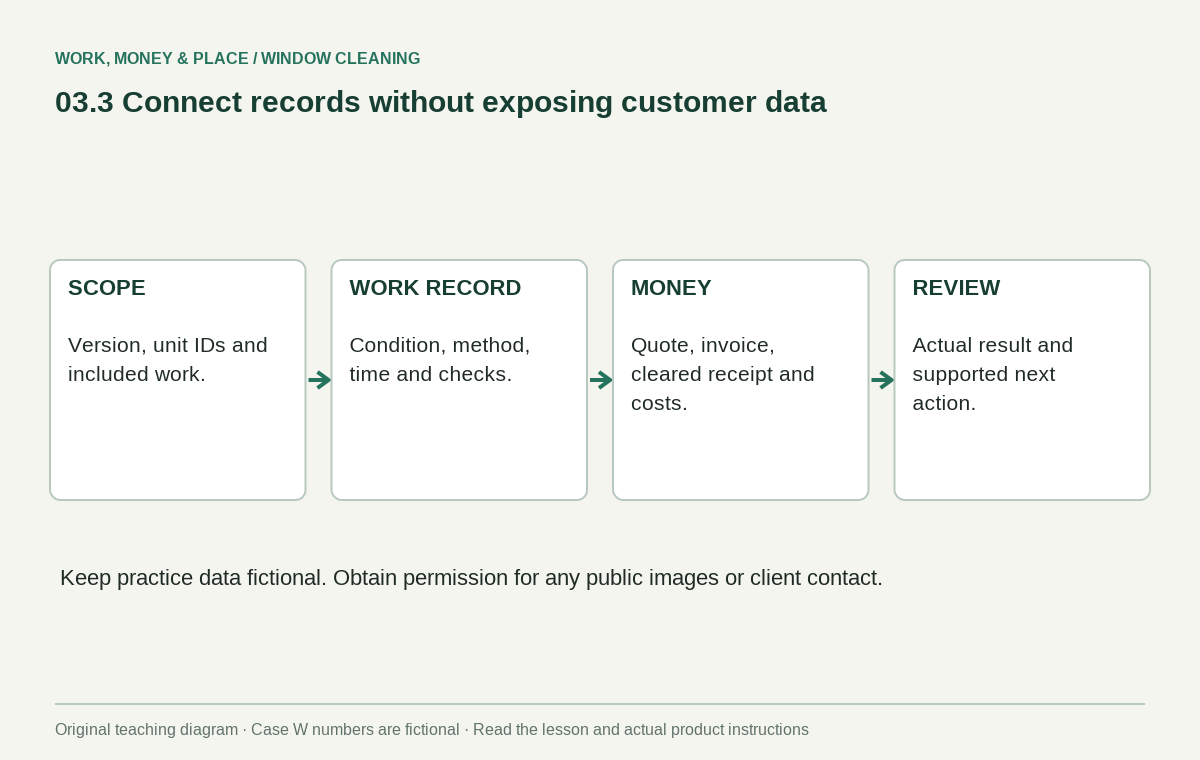
A business record should let you answer what was agreed, what happened, what was charged, what was paid, and what remains unresolved. Give each job an identifier and connect the inquiry, assessment, counted schedule, scope, quote version, accepted changes, work checks, invoice, receipts, and time record. A bank deposit alone cannot explain which surfaces were cleaned or which customer amount it represents.
The IRS describes recordkeeping systems that clearly show income and expenses and retain supporting documents. A simple system can work when the entries are complete and traceable. Software does not repair missing evidence, and a collection of photographs does not replace a record of the customer’s accepted scope. Use a structure you can maintain consistently after a tiring field day.
Separate the business decision record from the customer-facing document. Your estimate may contain internal time valuation, overhead, allowance, and method notes that do not belong on a customer invoice. The customer still needs a clear scope, accepted price and applicable tax, payment terms, and completion record. Consistency between the two is more important than making every document look identical.
Collect Only What the Operation Needs
For an inquiry, you may need a name, a way to reply, a service location or area, and the information required to assess the proposed work. Ask for the minimum useful scope information. You do not need a customer’s identity documents, personal financial history, or complete card details to decide whether an ordinary window-cleaning inquiry fits your service.
Photos can help with preliminary assessment, but request only relevant views and explain their purpose. Interior pictures may contain people, possessions, documents, or security information. Encourage the customer to remove or obscure unrelated details where possible. A photo review also has limits: it may not establish glass type, exposed coating, actual reach, component condition, or access permission.
Access information deserves a separate, controlled process. Do not place a real door or alarm code in a general practice worksheet, a public calendar title, a marketing caption, or an unprotected shared chat. Agree how access will be provided for the visit, who needs that information, and how it will be removed or retained appropriately afterward. A recurring booking does not justify keeping every access detail indefinitely.
Protect Working Files and Devices
Choose a protected place for actual customer and transaction records, restrict access to the people who need it, and use the security features appropriate to your devices and services. The FTC’s business guidance emphasizes understanding what personal information you hold, limiting collection and retention, and protecting what you keep. Practical controls matter even for a one-person business using a phone and computer.
Keep a backup and know which copy is current. A lost phone, a changed password, a deleted message thread, or a damaged device should not erase your only evidence of accepted work or payment. Use clear file names and versions, and separate draft quotes from accepted versions. When you correct a record, preserve the relevant history rather than quietly changing the agreed scope after the visit.
Never store complete payment-card details in a homemade worksheet. Use the appropriate payment process and retain the transaction reference and reconciliation evidence needed for your records. The course does not connect a real payment service or collect customer data. Its local notes are a practice convenience, not a protected customer-management system or a substitute for your own secure records.
Handle Photos Permission and Complaints Carefully
A photograph can serve different purposes: assessment, proof of an existing condition, a quality check, or marketing. Permission for one purpose does not automatically cover all the others. Agree the use and avoid recording identifiable people or unrelated property. Keep the original job evidence protected and prepare a separate appropriately permitted version if you intend to use an image publicly.
For a service concern, record the customer’s description, the affected window or component identifier, the time reported, relevant accepted scope, and the steps taken to investigate. Avoid changing the wording to make the report look better or worse. Your record should support a fair response, a correction decision, and any required insurer or other notification; it is not a collection of defensive accusations.
Do not publish a dispute or identifiable customer information in an attempt to win an argument. A public review response can acknowledge the concern and offer an appropriate private contact route without revealing details from an occupied home. The business goal is to understand and resolve the service issue, retain accurate evidence, and improve the process that allowed it to occur.
Know What the Course Saves and What It Does Not
Answers and completion marks in the local course review stay in that browser and device when storage is available. They do not create an enrolled account, synchronize across devices, or provide a server backup. Clearing browser data, using private browsing, or changing devices can remove or hide that work. Keep important answers in downloaded files and your own backup system.
The export control saves the answers on the current page; it does not gather every lesson and form at once or import text back automatically. Use fictional details for practice, export important pages separately, and save blank masters of the workbook and planner before using copies. Actual customer records belong in the protected system you choose for business operations, not in course exercise notes.
Set a retention approach by record purpose and applicable requirements. A temporary access instruction and a transaction document may have different reasons to be kept. Do not delete evidence required for tax, contract, insurance, or dispute records merely because a cleaning visit ended, and do not keep unrelated private details forever. Record the rule you will follow and revisit it when your tools or operation change.
Put it into practice
Your assignment
Design a job-folder structure and a minimal inquiry record using fictional details only.
Inputs
- One fictional job ID, scope version, count schedule, quote, work check, time log, invoice, and payment reference.
- Separate proposed uses for assessment photos, marketing photos, and access instructions.
Your deliverable
A W06 record structure and W05 privacy/recordkeeping decisions with a backup and retention action.
Saved only in this browser when storage is available. Export this page separately and use fictional identifiers in practice.
Show the worked answer
- Use one job ID to connect the accepted quote, changes, invoice, payment, and internal actuals.
- Keep an access code out of the public calendar and course notes; define a controlled delivery method for real work.
- Separate assessment permission from marketing permission and use only fictional practice images/data here.
- Store transaction references and supporting evidence, not homemade copies of complete card details.
Show the self-check criteria
- The record can reconstruct the transaction and service decisions.
- Only needed customer information is collected.
- Backup, access, and record-purpose decisions are identified.
- Browser notes are not described as a secure customer database.
Sources: BIZ-IRS-RECORDS, BIZ-FTC-PRIVACY.